
LINE, a message application that boasts the largest number of users in Japan, also supports the notification function that shows that the message has arrived even in the screen lock.If it is a short message, it is convenient to confirm the contents only by notification, but sometimes it is troublesome to receive notifications frequently.In such a case, LINE can be used comfortably by limiting the notification display.
LINEは「通知オフ」を活用することで快適になるの画像はこちら >>Once a talk is sent to your LINE account, you will receive a notification that indicates that, and you can check the notification even during the screen lock.However, in the case of official accounts that often receive talks, it is troublesome to receive something.
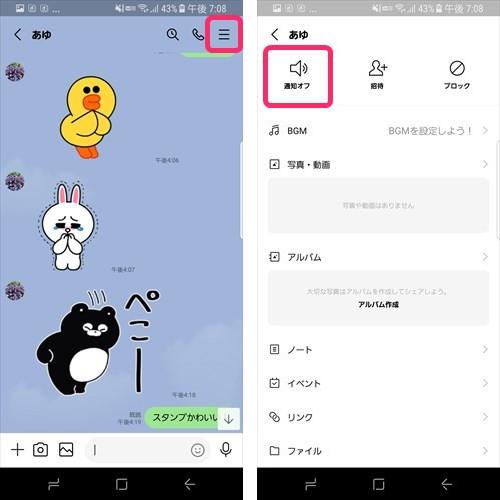
Therefore, LINE is equipped with a function to turn off only the talk from a specific partner.Press the upper right menu in the talk room and tap "Notification off" to stop the notification.To revive the notification, tap "Notification on" on the contrary.
In addition, when you are busy working, you can temporarily turn off all LINE notifications.If you select "Notification" → "Pause" from "Settings" on the upper left of the LINE home screen, select the time to pause from two types, "Stop for 1 hour" and "Stop until 8:00 am".In addition, you can manually cancel the suspension even during the pause time.
For notifications from LINE, in the initial settings, the message sender and the beginning of the message are also displayed on the lock screen.Just checking the notification on the lock screen will not be ready to read, so it is used as a trick to know the outline of the message without reading.
However, being able to check the message by displaying the lock screen means that others can see it without permission.You can see LINE notifications without permission while leaving the office, so it is safer to hide the LINE notification during work.
To prevent the message from displaying the message in the LINE notification, it is hidden by turning off the "Notification" → "Details of Message Notification" button on the LINE setting screen.
編集部おすすめ